SOL
Open SOL ↗

Built in Canada 🇨🇦 · 500 credits when you open an account

Your space to think further.

One chat. The best AI models. Tools to analyze, create and decide, live cards that alert you and automations that work for you. Smart AI picks the right model for every request.

  • ✓ No credit card
  • ✓ 500 free credits
  • ✓ Cancel anytime

Canadian platform · 11 languages

Conversation with SOL✦ SMART AI
+✦ Smart AI▮▮▯ Standard↑

Interactive SOL preview · illustrative answers

GPT 5.6 Luna GPT 5.6 Sol GPT 6 Astra Claude Haiku 5.5 Claude Sonnet 5 Claude Opus 5 Claude Fable 5.1 Gemini 3.5 Flash Lite Gemini 3.7 Flash Gemini 3.8 Flash Grok 4.3 Grok 4.6 Grok 4.7 DeepSeek V3.2 DeepSeek V4 Flash DeepSeek V4.1 Flash Qwen 3 32B Qwen 3.8 Flash Qwen 3.8 Max Nano Banana 2 Nano Banana Pro GPT Image 2.5 GPT Image 2.5 Edit Grok Imagine 2.0 Seedream 5.0 Pro GPT 5.6 Luna GPT 5.6 Sol GPT 6 Astra Claude Haiku 5.5 Claude Sonnet 5 Claude Opus 5 Claude Fable 5.1 Gemini 3.5 Flash Lite Gemini 3.7 Flash Gemini 3.8 Flash Grok 4.3 Grok 4.6 Grok 4.7 DeepSeek V3.2 DeepSeek V4 Flash DeepSeek V4.1 Flash Qwen 3 32B Qwen 3.8 Flash Qwen 3.8 Max Nano Banana 2 Nano Banana Pro GPT Image 2.5 GPT Image 2.5 Edit Grok Imagine 2.0 Seedream 5.0 Pro

SOL in 30 seconds

See it in action.

sol · app

Real capture of the app in demo mode.

SOL, step by step

See what SOL can do.

Chat, models, tools and personalization unfold as you scroll.

01 / CHAT

Start with a question.

Share an idea, attach a file, add context. Smart AI reads the request and hands it to the best-suited model — you don’t have to choose.

SMART AI

02 / MODELS

Pick the model that fits.

Let Smart AI route the request, or choose any model from GPT, Claude, Gemini, Grok, DeepSeek and Qwen — and create images with Nano Banana.

25 MODELS IN THE CATALOGUE

03 / TOOLS

Go from question to method.

Research, documents, business decisions, writing, comparison or study: each tool applies a real working method.

6 SPECIALIZED TOOLS

04 / THEMES

Make SOL your own.

Light and dark modes, seven accent colours. Try them here: the palette really recolours this site, and text always stays readable.

TRY THE PALETTE IN THE WINDOW

05 / CREDITS

Start with 500 free credits.

Credits are added as soon as you open an account. Your balance and the cost of each request are always visible in the app.

FREE SIGN-UP
SOLInteractive preview

✦ SMART AI

A conversation that moves with you

Help me turn this idea into an action plan.
Analyzing the request… Claude Sonnet 5
SOL

Let’s start with the goal, the constraints and a first verifiable step. Then we’ll compare options and refine the plan together.

Smart AI · Claude Sonnet 5 · 18 credits

New · Smart cards

Answers that stay alive.
Alerts that find you.

A score, a stock, the weather, the news, a price: SOL answers with a live card, not a wall of text. Tap the bell and SOL tells you at the right moment — even when the app is closed.

Live scores
Champions League78′
Liverpool1 – 1Arsenal
AAPL · Nasdaq
US$247.82▼ 1,4 %
Weather · Québec City
8°Rain from 2 pm
News
Interest rates: what to know before WednesdayBusiness · 3 h ago
Product price
AirPods Pro 2
249,99 $299,99 $
9:41

Saturday, October 18

9:41

  • Tap a bell 🔔

Tapping a notification opens the conversation, right on the card.

Demo: illustrative data.

Platform catalogue

The models in SOL.

Smart AI picks the route, or you choose a model directly. The catalogue is loaded live from SOL. 25 models.

25 models.

Six AI families, together in SOL.

Each finds its place.

GPT, Claude, Gemini, Grok, DeepSeek, Qwen and Nano Banana join the same system.

Smart AI at the centre.

Every request is drawn to the best-suited model.

Dark or light

From night to day.

SOL comes in a dark and a light theme. Keep scrolling: you’re there.

The tool library

Six tools. One interface.

sol · Deep Research
Deep ResearchSeveral live web searches, cross-checked sources and inline citations.
What support exists for a small business exporting to the US?
Web search (1/3) · federal programsWeb search (2/3) · US marketWeb search (3/3) · financingCross-checking 9 sources

Three federal programs apply [1], including one for the US market [2] and loans built for small businesses [3].

1 · canada.ca2 · tradecommissioner.gc.ca3 · bdc.ca
Live webSourcesSynthesisOpen in SOL ↗

New · Automations

SOL works while you live.

Pick a task and a time. SOL does it on its own, on its servers — even with the app closed — using your apps and the web. The result lands in a conversation, with a notification.

  • 7 ready-made templates, editable in one sentence
  • Daily, weekdays, weekly or monthly
  • Pause, resume or run now in one tap
  1. Morning briefingImportant emails, today’s meetings, weather and 3 priorities.
  2. Market updateIndexes, exchange rates and today’s business news.
  3. Email follow-upsEmails waiting for a reply, with drafts ready.
  4. Your team playsA reminder before the game, then every goal and the final score.
  5. GitHub digestFailing builds, open pull requests and issues.

Connectors · You stay in control

Your apps. Your rules.

500apps to connect, in one tap

SOL reads, summarizes and acts in Gmail, Calendar, Drive, Slack, Notion, GitHub, HubSpot, Stripe and hundreds more. For every action, you decide: allow, ask first, or never. The rule applies to every model and to automations.

Apps to connectOne-tap sign-in, your rules for every action.

Loading apps…

Permissions · Gmail
  • Read emails
  • Create a draft
  • Send an email
  • Delete messagesirreversible

Try it: change a rule.

Personalization

Your SOL, your colours.

Every colour, as a real capture of the app.
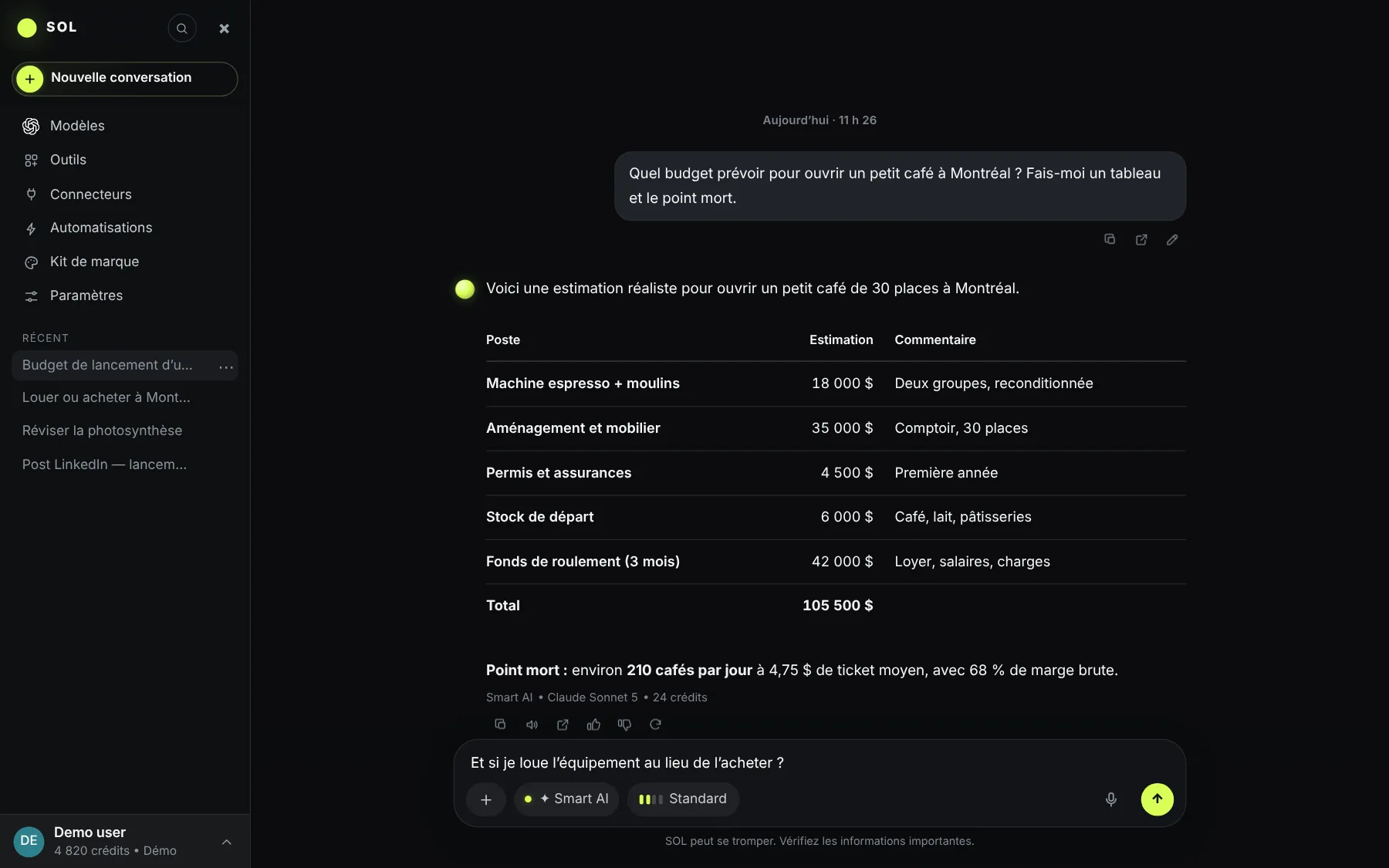
sol · app
SOL — Lime · dark theme

Why SOL

Everything you need. One app.

Without SOL With SOL
One subscription and one app per AIGPT, Claude, Gemini, Grok, DeepSeek and Qwen in one app
You guess which model to useSmart AI picks the right model for every request
Text to paste into Word or ExcelReal PDF, Word, PowerPoint and Excel files, in your colours
You keep checking scores, prices, the weatherLive cards and alerts that tell you
You redo the same tasks every dayAutomations that run on their own, even with the app closed
Copy-paste between your appsGmail, Calendar, Drive, Slack, Notion… on your rules

Use cases

One app. The way you work.

Founder · small businessPrepare a client proposal in one morning.
  • Budget and scenarios in a real Excel file
  • Proposal as a PDF in the company’s colours
  • Email draft ready in Gmail

Business Analyst · Brand kit · Gmail

StudentReview a chapter before the exam.
  • Summary of the course PDF, pages cited
  • Graded quiz and flashcards
  • Step-by-step help on the hard parts

Study Assistant · Document Analyzer

Content creatorPost all week without a blank page.
  • 3 versions of each post, in the right tone
  • Visuals made with Nano Banana
  • Ideas sent every morning by an automation

Content Creator · Automations

Team leadStart the day with what matters.
  • 7:30 briefing: emails, meetings, priorities
  • GitHub and Slack digest on Mondays
  • Anything sent is confirmed first

Automations · Slack · GitHub

Real estate agentPrepare a showing and its listing sheet.
  • Property sheet as a PDF in the agency’s colours
  • Neighbourhood overview with cited sources
  • Client follow-up written, sent once confirmed

Deep Research · Brand kit · Gmail

BookkeeperClose the month without redoing the spreadsheet.
  • Stripe sales and QuickBooks entries side by side
  • Monthly Excel report with formulas
  • Invoice reminders as drafts

Stripe · QuickBooks · Business Analyst

Sales repWalk into every meeting prepared.
  • Client brief pulled from HubSpot
  • Today’s calendar summed up every morning
  • Follow-up emails ready to confirm

HubSpot · Calendar · Automations

Marketing managerLaunch a campaign in a day.
  • Plan and publishing calendar
  • Visuals in the brand’s colours
  • PowerPoint deck for the team

Content Creator · Brand kit · Nano Banana

Freelance designerGo from brief to first concepts.
  • Client brief summed up in key points
  • Visual concepts generated in minutes
  • Quote as a PDF, ready to send

Document Analyzer · Nano Banana · Brand kit

DeveloperUnderstand a repo and fix a bug.
  • Open GitHub issues summed up
  • The same question asked to 3 models
  • The code explained step by step

GitHub · Compare AI

Data analystTurn a raw export into decisions.
  • CSV or Excel file analysed and cleaned
  • Pessimistic, base and optimistic scenarios
  • Charts and table ready to share

Business Analyst · Document Analyzer

TeacherPrepare a lesson and its assessment.
  • Lesson plan drawn from a PDF textbook
  • Interactive quiz with answers
  • Slides ready to show

Study Assistant · Document Analyzer

Researcher · journalistCheck a story against reliable sources.
  • Several cross-checked web searches
  • Citations in the text
  • Structured Word report

Deep Research · Document Analyzer

Retail investorFollow stocks without staring at the screen.
  • Live prices in a card
  • An alert when a threshold is crossed
  • Calculations and scenarios shown

Alerts · Business Analyst

Busy parentOrganise the family’s week.
  • Meal plan and grocery list
  • Activities added to the calendar
  • Tomorrow’s weather every evening

Calendar · Alerts · Automations

TravellerPlan a trip without twenty tabs.
  • Day-by-day itinerary
  • Options compared with sources
  • An alert if a flight price drops

Deep Research · Alerts

Illustrative scenarios of what SOL can do, not customer reviews.

What SOL changes day to dayIllustrative examples — SOL is launching, the first customer reviews will show here.
“I prepare my proposals twice as fast, and the files are ready to send.”
CRCamille R.Small business ownerSmart AI
“The 12-month budget came out with formulas. I only had to check it.”
MLMathieu L.Financial analystExcel
“The quizzes and flashcards changed how I study.”
SMSofia M.Law studentQuiz
“One subscription instead of three, and Smart AI picks for me.”
ABAntoine B.ConsultantGmail
“The alert on my stock reached me before I even opened my broker.”
LDLéa D.InvestorAlerts
“Comparing Claude and GPT on the same code without switching tabs: perfect.”
KSKarim S.DeveloperGitHub
“SOL remembers my projects. I no longer re-explain the context.”
JTJulie T.Project managerMemory
“My market summary lands every Monday morning, on its own.”
OPOlivier P.Real estate agentAutomations

🇨🇦 Made in Canada

AI built here. Transparency that matters.

Origin
SOL is a Canadian project, built for people here and elsewhere, in 11 languages.
Current storage
Data infrastructure currently uses a region in the United States (Ohio). Data is not yet hosted in Canada.
Our goal
Move storage to a Canadian region and document the change clearly.
Your rights
Export all your data or delete your account in one click, from the settings.
Security
Data encrypted in transit and at rest, isolated per account. Payments by Stripe: SOL never stores your card.
AI models
Requests are sent to the provider of the model used. Where processing happens depends on the provider.

Status verified on September 30, 2026. This will be updated as SOL’s architecture evolves.

Pricing

Start free. Grow when you want.

FreeTo discover SOL
0 $US

Forever

500credits when you sign upUp to ≈ 71 messages or ≈ 3 images
EcoStandardPremiumMax
  • All 25 models with Smart AI
  • The 6 tools and file creation
  • No credit card
Create an account
StarterFor regular use
9.99 $US / month

Billed monthly

15,000credits per monthUp to ≈ 2,142 messages or ≈ 107 images
EcoStandardPremiumMax
  • Everything in Free
  • Premium effort: Smart AI aims for the most capable models
  • Credit top-ups when you need them
Choose Starter
ProFor heavy use
39.99 $US / month

Billed monthly

60,000credits per monthUp to ≈ 8,571 messages or ≈ 428 images
EcoStandardPremiumMax
  • Everything in Creator
  • Max effort: the deepest reasoning
  • 4× Starter’s credits
Choose Pro

Credit carry-over

Your credits never go to waste.

Whatever you don’t use stays in your balance. And because Smart AI picks the cheapest model that does the job well, the credits it saves you are added to next month’s.

  • ✓ No reset when your plan renews
  • ✓ Top-ups add up too
Month 1 · 30,000
Used 18,60011,400

↓ + 11,400 saved with Smart AI, carried over

Month 2 · 41,400 available
+11,400New 30,000
Illustrative example with Creator; actual savings depend on your requests.

Effort: Eco and Standard let Smart AI pick an economical model; Premium and Max steer Smart AI to the most capable models and deeper reasoning, and use more credits. Estimates with SOL’s economical models.

Full pricing, top-ups and FAQ →

Teams: SOL Business at 29.00 USD per user per month, 45,000 credits per user. Taxes extra.

FAQ

Before you start.

Is it really free to start?

Yes. Opening an account gives you 500 credits, no credit card required. Try the models, tools and file creation before picking a plan.

What is a credit?

SOL’s unit for model usage. A simple answer costs a few credits, a deep analysis or an image more. Your balance and the cost of each request are always visible.

Can I cancel anytime?

Yes, from the settings. Your plan stays active until the end of the period you already paid for.

Which models are included?

GPT, Claude, Gemini, Grok, DeepSeek and Qwen, plus Nano Banana and Seedream for images. The catalogue on this site is loaded live from the app.

Can SOL act in my apps without asking?

Only if you allow it. By default, SOL reads and prepares drafts; anything it sends, changes or deletes goes through a confirmation card. You can set every action: allow, ask or never.

Where is my data?

Encrypted and isolated per account. Storage currently uses a US region; the goal is to move to a Canadian region. You can export everything or delete your account in one click.

Which languages?

The app comes in 11 languages: English, French, Spanish, German, Italian, Portuguese, Dutch, Polish, Japanese, Korean and Chinese. SOL answers in the language of your question.

Your next workspace

One platform. More ways forward.

500 free credits. No credit card required.

Create my free account ↗

Coming soon to the App StoreUntil then, add SOL to your iPhone home screen from Safari: Share › Add to Home Screen.